RPG-style tutorial video — Pixel RPG quest style
Make a tutorial played like a pixel art RPG quest: a checklist ticked on the word, a dialogue box, an inventory, a chest and full-screen spells.
Starter に含まれ、81種類のスタイルすべてと独自のスタイルが使えます · プレビューは ClipOnIt エンジンで生成
このスタイルの見た目
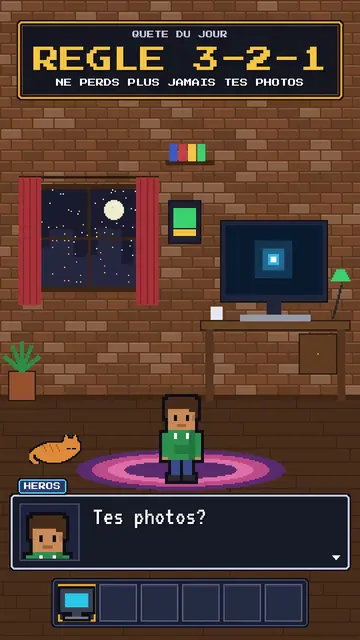
Pixel RPG quest turns your tutorial into a video game played on screen. The set is pixel art: a bedroom at night with the pixel hero, their computer and their cat, or a castle under the northern lights. On top sits an RPG interface: at the top, the checklist of the day's quest, whose steps tick on the spoken word; at the bottom, a dialogue box where the hero or an AI speaks; and an inventory bar with a sword, potion, key or computer.
Frames are golden like in old games, and win moments show a “QUEST COMPLETE” panel, a chest opening with its loot or a counter. Between two chapters, a full-screen spell bursts out, fire, ice, lightning or stars. The camera can zoom into the computer screen, where lines type themselves like in a terminal. The hero changes pose: idle, victory, or casting a spell.
向いているテーマ
Avoid: grave or sad topics: the game tone would make them feel light. Also avoid topics without steps to tick; the quest needs concrete goals, not just a story.
- Step-by-step tech tutorialsEach step is a quest line that gets ticked: viewers know how many are left.
- Digital safety rulesBackups, passwords, updates: the quest makes a chore almost fun.
- Gaming and geek culture videosRPG codes speak straight away to an audience of players.
- Challenges and goalsThe chest and the “QUEST COMPLETE” panel reward the ending, like in a game.
このスタイルの動画アイデア
- The 3-2-1 backup rule
The “never lose your photos” quest, the three steps ticked, the chest and the “QUEST COMPLETE” panel.
- Create an unbreakable password
The key in the inventory, the zoom into the screen and the ice spell at the end.
- Install your first local AI
The bedroom at night, the computer typing commands and the AI speaking in the dialogue box.
- The 4 steps to launch your channel
The castle, the checklist ticking and the subscriber counter in the chest.
1クリックで利用可能
- このスタイルのリンクを開く
「このスタイルで動画を作成」ボタンを押すと、そのスタイルを選んだ状態でエディターが開きます。アカウントがなくても、登録は1分ほどで、カード情報も不要です。
- 一文でテーマを書く
テーマは一つで十分です。テキストを貼り付けるか、Starterからマイクに向かって話すこともできます。その場合、動画はあなたの声をもとに作られます。
- 確認してから書き出し
AIがシーンを作成し、スタイルの要素を配置して、言葉のタイミングに合わせます。音声と字幕も付きます。気になる箇所を直せば、数分で縦型MP4が届きます。
調整できる項目
For each scene you pick the set (bedroom, castle or screen), the quest and its ticked steps, the big gold-framed banner, who speaks in the dialogue box and their name, the hero's pose, the lines typed on the screen, up to two panels (quest complete, chest, counter), the entry spell and the inventory.
よくある質問
無料プラン、出力、用途について:手短にお答えします。
Do I need to know video games?
No. Just write your tutorial in steps: the engine puts them in the quest, ticks each step on the right word and adds the game panels.
自分の声を使えますか?
Yes. Record yourself or import your audio: steps tick and spells burst on your words.
Pixel Newsとはどう違いますか?
Pixel News tells the news in grey-and-red pixel art, in a TV bulletin tone. Pixel RPG quest turns a tutorial into a game, with a quest, inventory and colourful spells.
このスタイルは無料プランで使えますか?
いいえ、Starter($29/月)に含まれます:月15本のウォーターマークなし動画と、81種類のスタイルすべて、さらに独自のスタイルも。無料プランでは月3本まで、ウォーターマーク付きで、他の8スタイルが使えます:Pixel News、Press paper、Comedy cartoon、Class sketch、Night tale、Social screen、Retro synthwave、Flat vector。