Content creator video — Thumbnail wall style
Make a video for content creators: a wall of video thumbnails on midnight blue, a zoom through the wall, gold serif numbers and a growth curve on the word.
Starter に含まれ、81種類のスタイルすべてと独自のスタイルが使えます · プレビューは ClipOnIt エンジンで生成
このスタイルの見た目
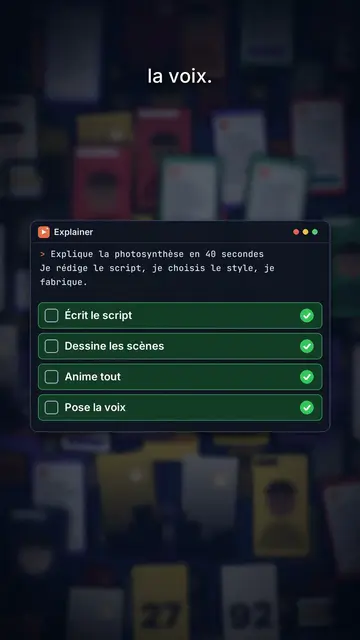
Thumbnail wall covers a midnight blue background with dozens of video thumbnails set in depth, like a wall of content stretching out of sight. The camera moves forward and passes through the wall: thumbnails in the middle plane stay sharp, those in front and behind blur. The big title at the top centre mixes a bold white sans-serif with words in italic serif, and key words get framed by small orange corners, like in a viewfinder.
Numbers show in giant gold serif and roll to their value, with a mono line underneath. When an object is needed, a card comes in on the word: a 3D product box in chains whose padlock pops open, a code window with a checklist, a growth curve drawing itself, a grid. The wall can darken and blur behind a card, a green “FREE” stamp lands, and the end types “Comment WORD” into a field.
向いているテーマ
Avoid: topics unrelated to screens or content, like cooking, nature or ancient history: the thumbnail wall would make no sense. Also avoid sad topics; the tone stays one of growth.
- Content creation methodsThe thumbnail wall speaks to creators straight away: it is their daily life.
- Tools and products to unlockThe chained box whose padlock pops shows the access you get.
- Growth figuresThe rolling gold number and the rising curve make a result feel credible.
- Free offersThe green “FREE” stamp and the comment field push viewers to act.
このスタイルの動画アイデア
- Nobody filmed any of these videos
The thumbnail wall, the “Zero filming” title, the gold number and the “FREE” stamp.
- Post every day without burning out
The video grid, the checklist in the code window and the rising curve.
- The format that got me to 10,000 subscribers
The zoom through the wall, the rolling number and the key word in orange corners.
- The tool I use for my thumbnails
The chained box opening, the grid and the “Comment TOOL” field.
1クリックで利用可能
- このスタイルのリンクを開く
「このスタイルで動画を作成」ボタンを押すと、そのスタイルを選んだ状態でエディターが開きます。アカウントがなくても、登録は1分ほどで、カード情報も不要です。
- 一文でテーマを書く
テーマは一つで十分です。テキストを貼り付けるか、Starterからマイクに向かって話すこともできます。その場合、動画はあなたの声をもとに作られます。
- 確認してから書き出し
AIがシーンを作成し、スタイルの要素を配置して、言葉のタイミングに合わせます。音声と字幕も付きます。気になる箇所を直せば、数分で縦型MP4が届きます。
調整できる項目
For each scene you pick the shot (sharp wall or darkened wall behind the cards), the title and its serif words, a gold number with its line, a card on the word (box, code, curve, grid or element), a stamp, a small note at the bottom and the word to comment at the end.
よくある質問
無料プラン、出力、用途について:手短にお答えします。
Are the wall thumbnails real videos?
No, they are thumbnails drawn by the engine, with no real channel or creator. You can import your own images if you want to show your work.
自分の声を使えますか?
Yes. Record yourself or import your audio: the zoom, numbers and cards lock onto your words.
How is it different from Social screen?
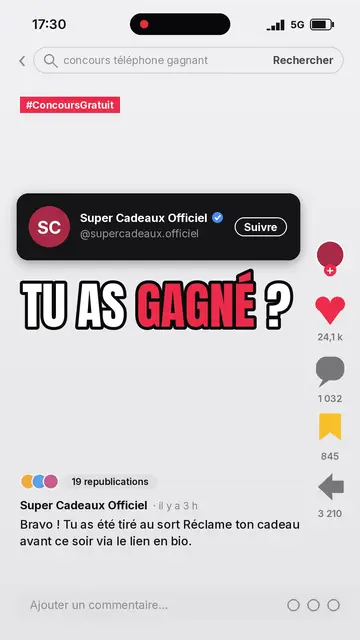
Social screen recreates a social feed with a profile, counters and comments. Thumbnail wall shows a wall of videos in depth crossed by the camera, with product cards.
このスタイルは無料プランで使えますか?
いいえ、Starter($29/月)に含まれます:月15本のウォーターマークなし動画と、81種類のスタイルすべて、さらに独自のスタイルも。無料プランでは月3本まで、ウォーターマーク付きで、他の8スタイルが使えます:Pixel News、Press paper、Comedy cartoon、Class sketch、Night tale、Social screen、Retro synthwave、Flat vector。
このスタイルがお好みなら
- 無料
ソーシャルメディア向け解説動画
ソーシャル画面スタイル · SNSのフィードを再現:プロフィール、カウンター、コメント。

AI coding tutorial video
Twilight desktop style · A fake computer desktop on a violet-pink sunset: windows swinging in 3D, a walking avatar.

Cut-out photo dialogue video
Cut-out photo style · Black-and-white people cut out like stickers on a blue-violet gradient, a giant navy title.